Thanks for choosing Dobson Fiber. You're about to get 100% fiber internet with no contracts and no data caps, backed by a team that treats you like a neighbor. Here's everything you need, from install day to your first bill.
Installation is free, and we handle the heavy lifting. Here's what to expect.
Watch for your appointment confirmation by email and text, plus a phone call from your technician. Need a different time? Call 855.5.DOBSON, Monday through Saturday, 7 AM to 8 PM.
Download the free eero app (App Store or Google Play) and create your account. An adult 18 or older must be home for the whole appointment.
In 45 minutes to two hours, your technician runs a fiber line from the street to your house and sets up your eero where it gives you the best coverage.
Before we leave, we run a speed test, check Wi-Fi coverage room to room, and help you connect your first devices. After that, our tech support team is here 24/7.
Before install day, jot down everything in your home that uses Wi-Fi so nothing gets left behind. Your technician will help you get your first devices online.

TVs, streaming sticks and set-top boxes.

Video doorbells, security cameras and alarm panels.
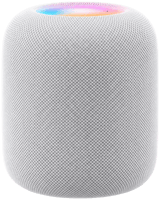
Speakers, displays, thermostats and smart-home hubs.
Everything you carry from room to room.
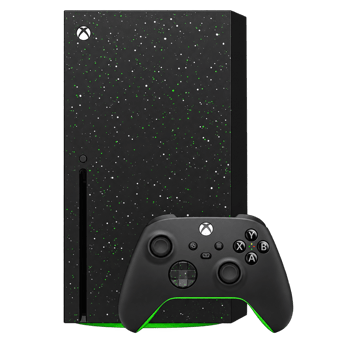
Consoles and gaming PCs need a connection for updates, downloads and online play.

For the smoothest play, plug your console into your eero with an Ethernet cable.
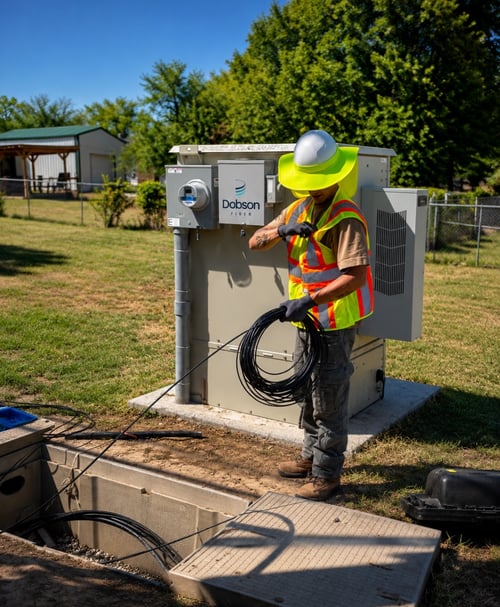
Most installs take 45 minutes to two hours. Your technician will walk through the plan with you, choose the best route for your fiber line, and connect it from the street to your home. Inside, they'll set up your eero in the spot that gives you the best coverage, then test everything with you before they leave.
Have these ready:

Take a quick look at what happens when a Dobson Fiber technician comes to your home, so you know exactly what to expect.
Questions before your appointment? Call 855.5.DOBSON.
Every Dobson Fiber plan comes with a WiFi 7 eero router at no extra cost, plus free eero Secure: advanced security, parental controls, ad blocking and Internet Backup.
Plans up to 2 Gigs
Dual-band WiFi 7 that handles 120+ devices.
5-Gig plan
Tri-band WiFi 7 that handles 200+ devices.
10-Gig GO GIG™ plan
Tri-band WiFi 7, 200+ devices and four Ethernet ports.
Place your eero up high and out in the open. Walls, cabinets and fish tanks slow Wi-Fi down.
Change your network name and password, pause the internet at dinner, or see what's connected.
See what your fiber can do anytime with the Dobson Fiber speed test. Want more speed or new equipment? Call 855.5.DOBSON.
No contracts and no surprise fees. Dobson Fiber has four monthly billing cycles, and you're placed in one based on your installation date. Service is billed in advance.
Your first bill covers the days from your installation to the start of your billing cycle, plus your first full month, so it will be a little higher than your regular bill. Your account number is printed on it. You'll need it to set up your online account.

Tech Support is available 24/7 at 855.5.DOBSON. Customer Care is available Monday through Saturday, 7 AM to 8 PM. Contact us
Most installs take 45 minutes to two hours. An adult 18 or older needs to be home for the whole appointment.
Nothing. Installation is free.
No. Dobson Fiber residential internet has no contracts.
No. Your data is unlimited. Stream, game and work as much as you want.
Call 855.5.DOBSON (855.536.2766). Tech Support is available 24/7 for anything related to your internet or Wi-Fi. Customer Care can help with billing and account questions Monday through Saturday, 7 AM to 8 PM. You can also reach us through our contact page.
Dobson Fiber has four monthly billing cycles, and you're placed in one based on your installation date. Service is billed in advance, so your first bill includes the days from your installation to the start of your cycle plus your first full month.
Give us a call. We can help you find the best spot for your eero or add an eero extender for hard-to-reach areas.
Your eero's Internet Backup can help keep you connected, and our tech support team is available 24/7 at 855.5.DOBSON.
Yes. To upgrade your speed or equipment, call 855.5.DOBSON.
Yes. Both are available in your online account at dobson.net/pay-your-bill.
Run the free Dobson Fiber speed test. For the most accurate result, test from a device connected to your eero with an Ethernet cable.
Fiber brings blazing speed to your door. These simple tips help that speed reach every room, over Wi-Fi and wired connections alike.
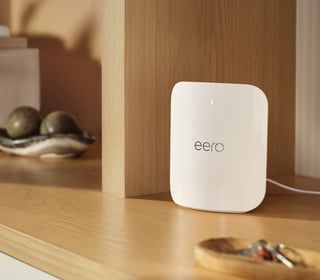
Wi-Fi signals spread out and down, so place your eero on a shelf or tabletop, a few feet off the floor. Avoid the floor, closets and enclosed cabinets.
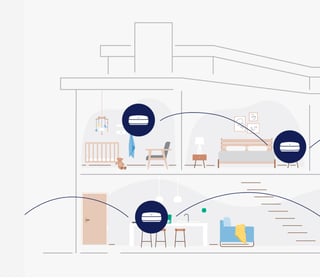
Larger homes, multiple floors and backyard spaces may need more than one eero. An extra eero works with your main one as a single mesh network. Place it about halfway between your main eero and the weak spot. Call 855.5.DOBSON to add one.
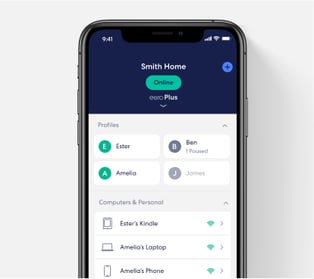
See which devices are connected, restart your network, and spot weak areas. If something feels slow, run the Dobson Fiber speed test or call our 24/7 tech support.
Put your eero near the middle of your home and close to where you use the internet most, out in the open rather than tucked behind a TV or in a corner.
Keep your eero away from microwaves, refrigerators, cordless phones and baby monitors. Thick walls, metal, mirrors and fish tanks can block the signal too.
For the fastest, steadiest connection, plug game consoles, smart TVs and desktop computers into your eero with an Ethernet cable. Cat 6 or newer cables get the most out of multi-gig plans.
Fiber gives you fast, symmetrical speeds with no data caps, so you can download, stream and play as much as you want. These tips help you turn all that speed into lower ping and smoother matches.

Your eero app comes with free parental controls through eero Secure. A few minutes of setup gives you control of every screen in the house.
For $8/month, eero Plus adds extra protection for the whole family on top of the free eero app:
Know someone who's still stuck with slow internet? Send them to dobson.net to check their address.
Building Stronger Connections™